A print-and-use checklist covering everything to confirm before a VR session starts. Reduces cognitive load during the session itself and makes handovers between colleagues consistent.
Type: ChecklistLicense: CC BY-SA 4.0Pages: 6Last reviewed: 2026-05-20
Share this
Get this resource
Open in Google Docs to copy and adapt, or download as a PDF.
Free to adapt under Creative Commons BY-SA 4.0. Attribution: withVR (withvr.app/resources).
Work top-to-bottom. Aim to complete sections 1-3 before the individual arrives, and sections 4-5 with them in the room.
1. Before the session - environment
Room booked for session length plus 10 minutes buffer (debrief, setup, put-away).
Clear floor space around the seat - no tripping hazards within the headset's guardian boundary.
Seat is stable and comfortable; preferably with arms.
Laptop charged or plugged in.
Internet connection tested (VR software is cloud-connected).
Headset charged and cleaned.
Silicone face cover fitted (if shared across individuals; sold separately by third-party retailers - withVR does not sell hygiene supplies).
Water available for before and after the session.
2. Before the session - software setup
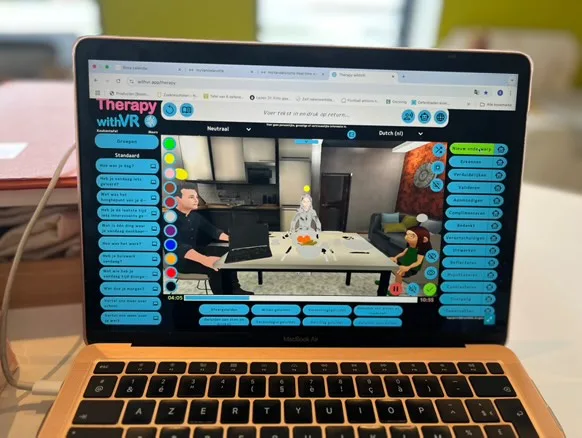
The clinician console you'll use to set up Section 2 - Setup tabs for situation, avatars, voices, sentence groups, and duration controls all live here.
Individual's profile selected in the web app.
Session goal written in the profile (one line: what are we practicing today?).
Avatar(s) placed and emotion defaults set to what you want to start with.
Voice(s) configured - language, voice type, pitch and rate where supported (pitch and rate adjustments are only available for WAVENET and STANDARD voices).
Sentence groups prepared in the Sentences tab - opening prompts, planned utterances, conversation starters.
Maximum Duration set to suit the individual (default is 15 minutes; for a first session, 5 minutes or less is recommended).
Objects toggled on or off as needed (e.g. Laptop visible if you plan to display text inside VR).
A simpler backup profile or situation in mind in case the planned one needs to drop in complexity. Sounds are triggered live during the session, not pre-selected at setup.
If you intend to use any AI features in this session, the individual has agreed to AI use as part of their consent. AI features are off by default - only enable a feature if specific consent for it is on file.
Today's session plan shared with the individual in advance (or as a recap at the start).
4. With the individual in the room - before the headset goes on
Recap what today's session will look like and what we are practicing.
Confirm the agreed "stop" signal - verbal, gesture, or tap.
Ask: "Is there anything that's come up since last time that changes what we do today?"
Fit the headset - confirm it is comfortable, balanced, and the display is clear.
Headphone volume checked and acceptable.
5. During the session - things to remember
Start below the individual's edge - easier than last session, or the agreed baseline.
Pause between prompts. Give thinking and speaking time.
If you would like to see the live view of what is happening inside the headset, set up Meta Quest casting on a separate screen before the session starts. The Therapy withVR web app does not show a live VR view - it shows the situation you have configured and the controls you are using.
Notice stress signals before the individual becomes distressed - posture, breathing, speech rate, verbal hesitation.
Name what you see gently ("it looks like you're finding this challenging - want to pause?").
Do not surprise the individual with new elements mid-flow unless agreed.
6. After the session - debrief & record
Post-session confidence rating recorded.
Brief debrief: what felt manageable, what felt challenging, what to try next time.
Ask the individual: "What would have made the situation easier?" Capture the answer in their own words.
Ask the individual: "What do you want to make more challenging next time?" Capture the answer in their own words.
Translate those answers into specific Setup changes for next session (e.g., fewer or different avatars, different emotions, different sentence groups, room layout). The environment changes; the person decides what changes.
Individual's own words noted (in their language, not paraphrased).
Next session goal agreed, even if tentative.
Session notes completed in your usual clinical record system.
Headset, cover, and controllers cleaned per your service's protocol.
Handover. If a colleague will cover the next session, add a one-line summary to the individual's profile: what worked today, what not to try without discussion, and where to pick up from.