Informed Consent Template for VR Sessions

A consent template covering the specific considerations that come with using virtual reality in speech-language, voice, or communication work. Edit to fit your service, regulatory context, and local policy.
Get this resource
Open in Google Docs to copy and adapt, or download as a PDF.
This is a template, not a finished document. Legal and ethical requirements vary by country, region, service type, and population. Review your local informed-consent requirements (e.g. GDPR, HIPAA, FERPA, professional body codes) and adapt the wording with your compliance lead before use.
Consent to participate in VR-based speaking practice
Replace bracketed text with your service's details.
What is being offered
You are being offered the option to use a virtual reality (VR) headset as part of your speech-language, voice, or communication sessions at [service name]. During a VR session, you will wear a headset that shows a realistic speaking situation - for example a cafe, classroom, or meeting room. Your [clinician / therapist / supervising professional] controls the situation in real time from a laptop and is with you throughout.
What you choose
- You can accept or decline VR at any time. Declining does not affect any other part of your care.
- You can stop a session at any moment, for any reason, without explanation.
- You can ask to try VR once and then stop if it is not for you.
- You can ask your clinician to adjust the situation - fewer people, different environment, quieter sounds, shorter session.
What will happen in a session
- You will put on a headset. It covers your eyes and part of your face and contains small speakers or you will wear headphones.
- You will see and hear a speaking situation that your clinician has set up for you. Your clinician controls the situation in real time from a laptop and can change or pause it at any time. (If your clinician wants to see a live view of what you see inside the headset, they need to set up Meta Quest casting separately - it is not a built-in part of the web app.)
- You will be seated, in a clear space. Your clinician will stay within arm's reach.
- The headset uses a built-in Guardian boundary - a mesh that appears in view if you move too close to a wall or piece of furniture - so that you cannot accidentally walk into things. Therapy withVR sessions are designed to be done seated, with no large movements required.
- After the session we will talk about how it felt and what you would change next time.
Online and content safeguards
- The VR headset used at [service name] is a clinically-configured device. The web browser, app store, and unrelated apps are blocked or password-protected. You cannot accidentally access content outside the speaking-practice software during a session.
- Multi-user or social VR features are not used. You will not see or interact with other VR users.
- Some software may include in-world visual content (artwork, posters, signage). Where any image carries an age or content warning, this is flagged in the software and your clinician controls what is shown.
Age and parental consent
Meta, the manufacturer of most current consumer VR headsets, sets a minimum age of 10 for headset use, with a parent-managed account required for users aged 10-17. Where the individual is a minor, parental or guardian consent is required, and the protocol is adapted to the child's needs (shorter sessions, simpler situations to start, more frequent check-ins).
Emotional impact
VR speaking situations can feel very realistic. They can bring up feelings similar to those a real situation would - nerves, frustration, sadness, anger - and in some cases feelings linked to past difficult experiences. Your clinician will:
- Talk through what to expect before the headset goes on.
- Stay with you throughout and watch for signs that the situation is becoming too much.
- Pause or stop the session if needed, or take the headset off, at any point.
- Offer time to debrief at the end of the session.
You are encouraged to flag any topic, environment, or situation type that you would prefer not to encounter, before sessions begin.
Physical effects you should know about
- Some people feel dizzy, tired, or briefly nauseous after using VR. This usually settles within a few minutes of taking the headset off.
- The headset presses against the face and forehead. We will check the fit and can stop if it becomes uncomfortable.
- Prolonged VR use can tire the eyes. Sessions at [service name] are kept to [X minutes] or less, with breaks as needed.
- If you feel unwell during a session, tell your clinician or use the agreed signal to stop.
Data - what is and is not recorded
Adapt to your actual data practice.
- Audio and video of the session are [not recorded / recorded and stored as follows…].
- The VR system does record which avatars were used, which emotions were triggered, which sentences were sent by the clinician, and which sounds were played. This helps your clinician review and plan future sessions. No microphone recordings are made by the VR software itself (Therapy withVR).
- Therapy withVR is designed so that personal information does not need to enter the software. Your clinician uses role-based labels (for example "Profile A" or "Wednesday afternoon practice") rather than your real name, date of birth, diagnosis, or other identifying details. Any session records held by your service that link a real-world identity to a profile are managed by [service name], not by Therapy withVR.
- You can ask to see or delete the records held by your service at any time by contacting [service contact].
AI features (optional)
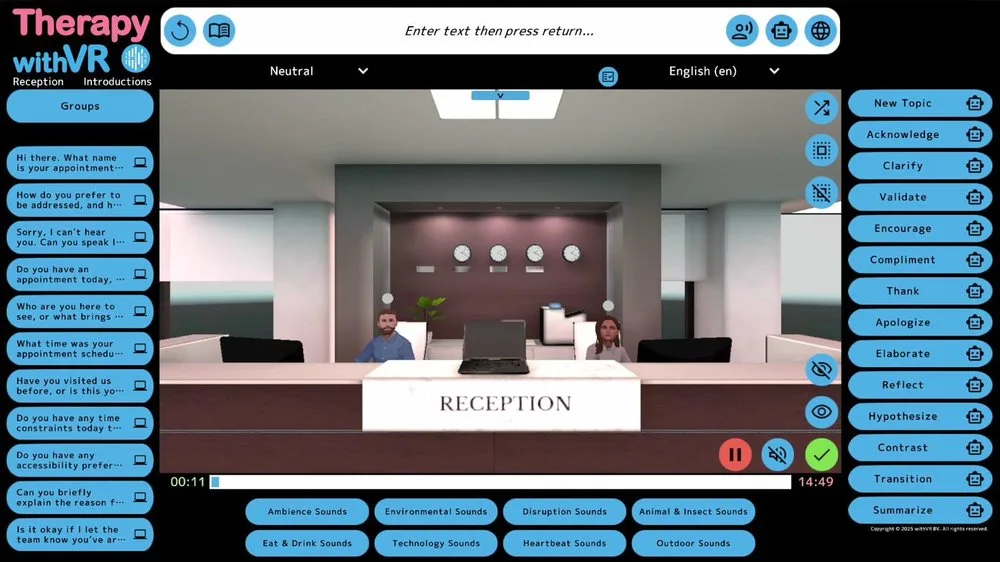
Therapy withVR includes optional AI-powered features that your clinician can choose to enable during a session. These can support translation between languages, generation of conversation text for avatars to say, and adjustments to how avatars speak. AI features are turned off by default. Your clinician will only enable a feature if you have agreed to its use for your sessions.
- You can decline the use of AI features without affecting any other part of your session or your care.
- If your clinician enables AI features, text they type for an avatar may be sent to an AI service for processing. Audio from your microphone is not processed by AI features unless your clinician specifically enables a transcription feature and tells you in advance.
- You can ask your clinician to disable AI features at any time, including mid-session.
Who will be with you
Only your [clinician / therapist / supervising professional] will be in the room during your VR session unless you have agreed otherwise (for example, a family member or interpreter).
Confidentiality & sharing
What you say and do in a session is confidential, within the normal limits that apply at [service name]. Exceptions are explained in our [privacy notice / service information leaflet].
If you change your mind
You can withdraw consent for VR at any time, without giving a reason, and without it affecting any other part of your care.
Declaration
I have read (or had explained to me) this information about VR sessions. I have been given the chance to ask questions and the answers I received were clear. I understand I can stop a session at any time and withdraw consent at any point.
The table is split into core and optional sections. The core items (1 to 3) are required for VR sessions to go ahead. The optional items (4 to 8) are agreed to one by one. Declining any optional item does not affect your participation in VR sessions.
| Consent item | Yes | No |
|---|---|---|
| Core consent items (required) | ||
| 1. I consent to taking part in VR-based practice sessions at [service name]. | ☐ | ☐ |
| 2. I consent to my session data (avatars, emotions, sentences, sounds - not audio) being stored for my clinician to review. | ☐ | ☐ |
| 3. I consent to my clinician using anonymized notes about my sessions in team discussions or supervision. | ☐ | ☐ |
| Optional consent items (decline any without affecting your sessions) | ||
| 4. I consent to my clinician enabling AI features during my sessions (translation, AI-generated avatar text, or similar). I understand AI features can be declined and disabled at any time, including mid-session, and that AI features are off by default. | ☐ | ☐ |
| 5. I consent to anonymous feedback about my experience being shared with the software developer (for example, withVR) for product improvement and research purposes. No identifying information is shared. | ☐ | ☐ |
| 6. I consent to my experience being shared, without my name, on the developer's social media, website, or in publications, where this would help others understand how the software is used. | ☐ | ☐ |
| 7. I consent to my session being used for teaching, learning, or training (for example, demonstrations to other clinicians or students), in a way that does not identify me. | ☐ | ☐ |
| 8. I consent to video or audio recording of my session for [stated purpose - e.g. clinical review, supervision, education]. (Recording of the user's own voice and responses is separate from the avatar voice and environment recording mentioned earlier and requires this specific consent.) | ☐ | ☐ |
Signatures
Name of individual: ________________________________________
Signature: _________________________ Date: ________________
Name of clinician: _______________________________________
Signature: _________________________ Date: ________________
For children or individuals with a legal guardian:
Name of parent/guardian: ___________________________________
Signature: _________________________ Date: ________________
Related resources
- VR Risk Assessment Template - The service-side risk assessment that pairs with this consent template.
- VR Suitability Screening Checklist - The pre-session screening that pairs with this consent step.
- Session Preparation Checklist - The clinician's pre-session checklist.
- Explaining VR to Clients and Families - Plain-language handout to share before consent.
- Technology Checklist for SLPs - Broader framework for evaluating any new clinical technology.