You have the headset ready, your laptop is open, and your next session starts in ten minutes. Now what do you actually do? Here are five practical ways to use VR speaking situations in your next session, each with a concrete scenario you can adapt to the individuals you work with.
1. Start simple: ordering at a cafe
The cafe environment is an ideal starting point for many individuals, whether you are working on stuttering, cluttering, selective mutism, or voice goals. A single interaction (placing a coffee order with one avatar behind the counter) is short, predictable, and low-stakes. It also bridges the gap between traditional role-play and real-world practice, something we explore in more detail in why VR speaking situations feel like the real thing.
Try this: Begin with the cafe empty except for the barista. Type a simple greeting for the avatar to say, and let the individual respond. Once that feels comfortable, use the clinician web app to add ambient sound from the available categories. In a later trial, add another avatar to the cafe to increase the social load. You are layering complexity in real time without ever removing the headset.
Because you control everything from your laptop, you can pause, adjust avatar emotions using any of the 11 available expressions, or switch the barista’s language to match a bilingual individual’s goals, all without interrupting the flow of the session.
2. Build toward a classroom presentation
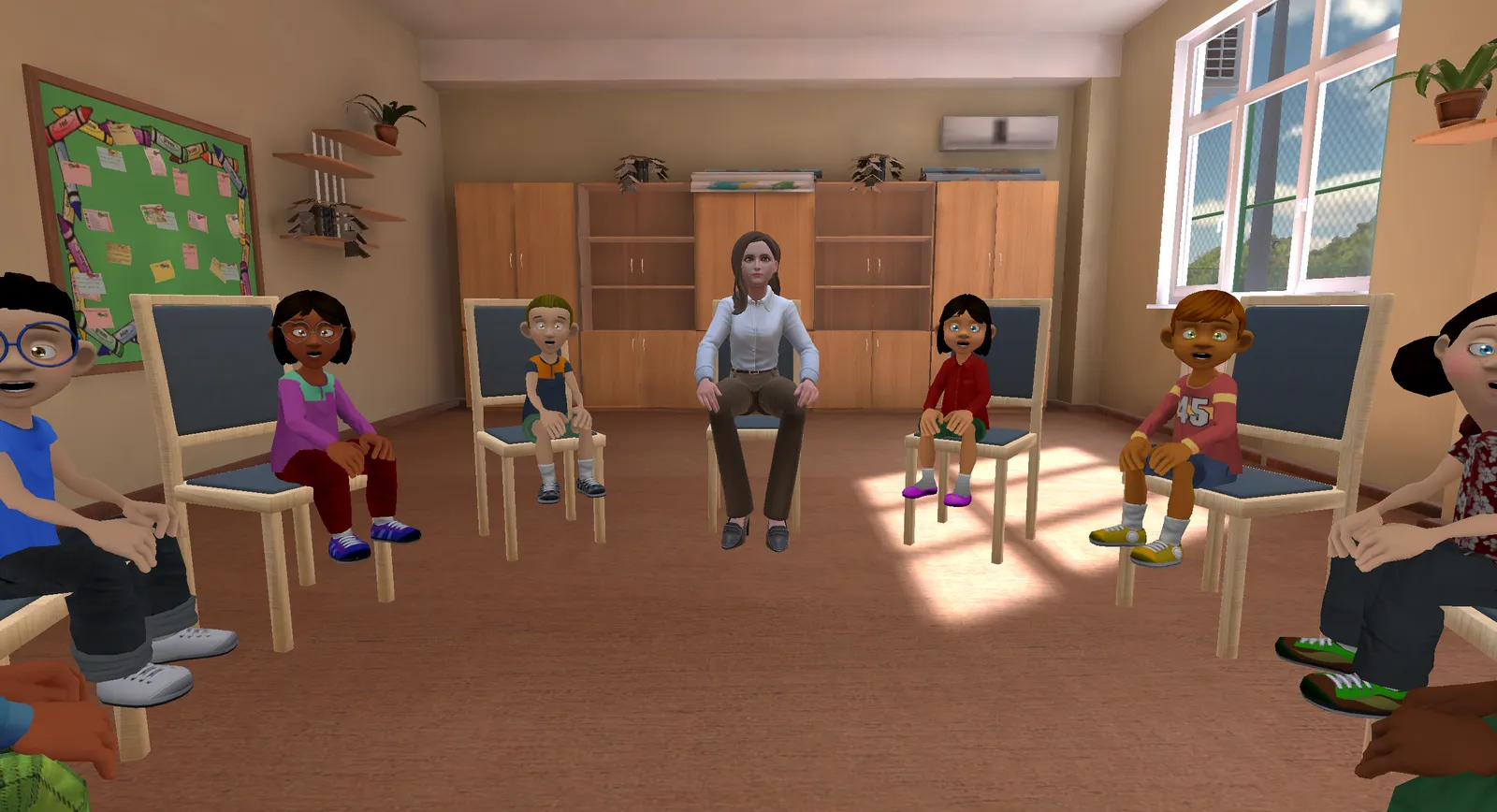
For school-age individuals or university students, the classroom environment lets you simulate one of the most anxiety-provoking speaking situations there is: standing in front of an audience.
Try this: Start with a small classroom: three or four seated avatars, all looking neutral and attentive. Ask the individual to introduce themselves or deliver a short prepared passage. Over the course of several sessions, increase the audience size, adjust avatar emotional expressions, or add an interruption you type in real time. You decide exactly when and how to raise the challenge.
This kind of graduated exposure is especially useful for individuals with selective mutism who are building toward participation in class, and for anyone working on speaking confidence in classroom-style situations. Saved profiles let you store a “Week 1” and a “Week 4” setup and switch between them instantly.
3. Practice a job interview or meeting
The meeting room environment brings a more formal tone that suits adults preparing for professional situations. Think job interviews, team stand-ups, or presenting an idea to a manager.
Try this: Set up two or three avatars seated around a conference table. Type interview-style questions for one avatar to ask (“Tell me about yourself,” “Why are you interested in this role?”) and let the conversation unfold naturally. You can adjust the formality of AI-generated text to match a professional register, or switch on translation if the individual is preparing for an interview in a second language. If you notice the individual is managing well, have another avatar interject with a follow-up question to raise the complexity mid-session.
This scenario works well across several clinical areas, including apraxia, dysarthria, and voice, where practicing speech in a realistic professional context is a meaningful goal.
4. Navigate everyday errands at the supermarket
Not every challenging speaking situation happens on a stage. For many individuals, it is the routine, unpredictable interactions (asking an employee where something is, responding to small talk at the checkout) that cause the most difficulty.
Try this: Use the supermarket environment and set up a short errand: the individual needs to find a specific item and ask an avatar employee for help. You can type the employee’s responses to keep the exchange natural and unpredictable. Add ambient store noise to increase the sensory load. For individuals working on hearing goals, this is a particularly realistic way to practice speech perception in background noise.
The beauty of this scenario is how ordinary it is. You are not asking the individual to perform. You are helping them practice a Tuesday afternoon.
5. Warm up with the animal environment
Sometimes the best way to begin a session is to take the pressure off speaking entirely. The animal environment does exactly that. There are no judgmental faces, no social expectations. Just a calm, engaging space.
Try this: Open the session in the animal environment and let the individual explore for a few minutes. For children, this can be a motivating way to build comfort with wearing the headset before transitioning to a speaking scenario. For adults who arrive at a session feeling anxious, it offers a reset. You might use the time to talk through goals for the day while the individual acclimates, then switch to a cafe or classroom setup when they are ready.
This is not filler. It is a deliberate clinical choice. Starting from a place of low arousal gives you a better foundation for the work that follows.
A note on getting started
Every one of these scenarios runs through the same setup: the individual wears a Meta Quest headset, and you control the environment from a web app that works on any laptop, in any browser. You can type what avatars say, trigger sounds, adjust emotions, and choose from 59+ languages and dialects if you work with multilingual individuals. Each AI feature can be toggled on or off individually, so the technology adapts to your clinical reasoning, not the other way around.
In every scenario, your clinical judgment drives the session - the VR is just the environment. The environments and tools are shaped by how individuals perceive their own experiences. That is the principle behind every detail in the software, and it is what makes these scenarios more than just visual backdrops. They are functional, adjustable, clinician-led speaking situations, ready whenever you are.
A quick note on privacy: no audio or video is recorded during any session. If you want to dig deeper into what to check before adopting any new technology, I put together a free checklist covering data privacy, AI transparency, and more.
Further reading
- 10 Ways SLPs Use VR - A longer companion list of clinical use cases and session ideas
- Session Preparation Checklist - The clinician’s pre-session workflow for any VR session
- Goal Rating Sheet - Pre and post confidence ratings to anchor each scenario
- IEP and EHCP Goal-Writing Template - For mapping these scenarios to plan goals
- Why VR speaking situations feel like the real thing - The evidence behind why these scenarios work
Want to see these environments in action? Get in touch and I am happy to show you the software and talk through how it might fit your caseload.